Case studies

Three dashboards, built from real datasets

Each one started as a spreadsheet nobody wanted to open. Here is what they became, what powers them, and the numbers behind each build.

01Finance · 2025 · Interactive report

10-Year Cashflow Dashboard

Macro-enabled Excel dashboard with slicers, pivot-driven KPIs and a full cashflow summary.

Cashflow horizon, 2025 to 2034
10 yrs
Charts on one page
9
Dataset rows
4,500+
Full rebuild from VBA
1 click
10-Year Cashflow Dashboard: KPIs, charts, slicers and the cashflow summary on one page Enlarge

How it works

A one-page cashflow dashboard that covers a ten-year horizon from 2025 to 2034. The top row shows total income, total expenses and net revenue with the margin, backed by an income-versus-expenses trend line. Public assets get their own radar chart and KPI block, and operational and foundation expenditures are broken out by sub-category.

Everything on the page is driven by two pivot tables on a hidden sheet. A calculation sheet reads them with GETPIVOTDATA, so the Year, Region and Sector slicers on the left filter every chart, KPI card and the cashflow summary table at the same time.

The whole dashboard is built by a single VBA macro. Press one button and it creates the pivot tables, the calculation sheet, nine charts, the summary table and the slicers. Re-running is safe: your dataset is never touched, only the generated sheets are rebuilt.

Up close

02Hospitality · 2025 · Management report

Hotel Business Performance

KPI dashboard with MTD, YTD and forecast views for revenue, occupancy, ADR and RevPAR.

Charts
15
Views: MTD, YTD and forecast
3
Switches the whole page
1 cell
Forward forecast
3 months
Hotel Business Performance dashboard with MTD, YTD and forecast views Enlarge

How it works

A hotel management dashboard that reads like a printed board report but updates live. The left panel tracks last-month performance: gross operating profit and total revenue against budget and last year, occupancy, occupied room nights, average daily rate and revenue per available room.

A single view selector switches the whole page between Month-to-Date, Year-to-Date and Forecast. Every KPI chip, variance line and chart re-points to the right column of the raw data, so the layout never changes while the story does.

The page also carries a three-month forecast with occupancy and ADR trends, a current-month snapshot with revenue mix, and a franchise-property section with key figures and a variance commentary block.

Up close

03Automation · 2025 · Excel macro module

One-Click Dashboard Builder

A reusable VBA module that generates a complete dashboard from any dataset table.

Sheets built
4
Charts generated
9
Build time
10–30 s
Excel version
2013+
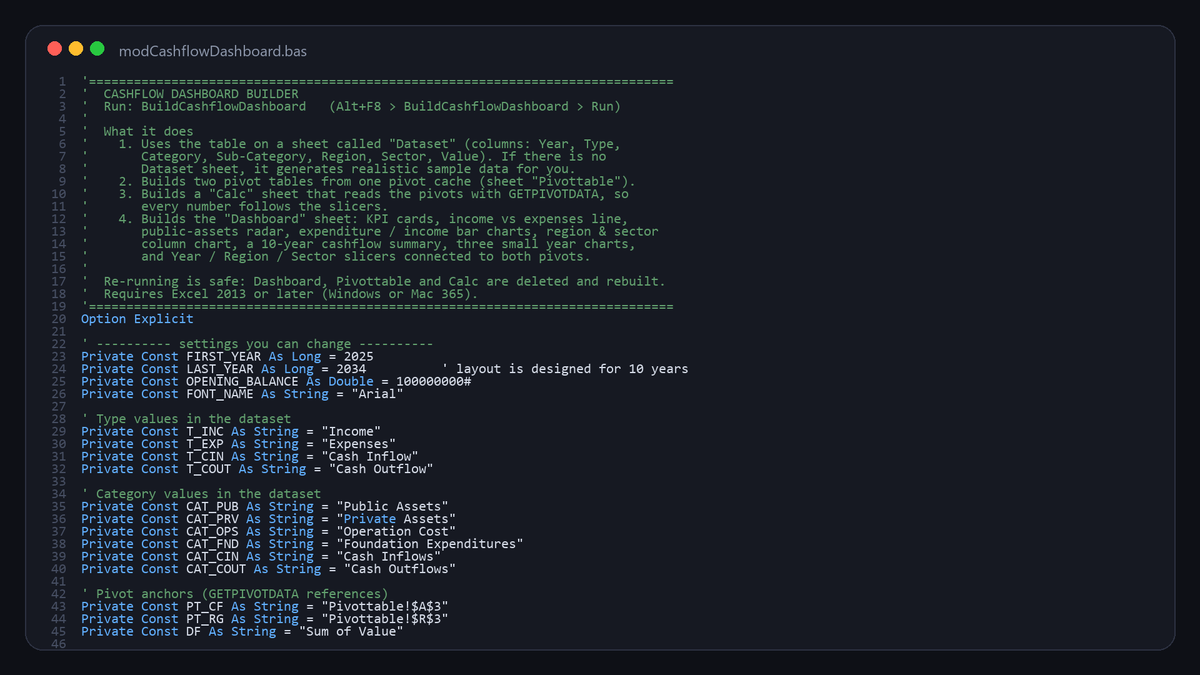
The BuildCashflowDashboard VBA module and its settings block Enlarge

How it works

The engine behind the cashflow dashboard, packaged as a standalone VBA module. Import it into any workbook, run BuildCashflowDashboard, and it builds the pivot cache, pivot tables, calculation sheet, charts, summary table and slicers in ten to thirty seconds.

The settings block at the top of the module controls the year range, opening balance, type and category names, and the lists of sub-categories, regions and sectors. Change them to match your data and the dashboard follows.

If the workbook has no Dataset sheet the macro generates realistic sample data first, so the first run always shows a finished dashboard. Error handling names the missing column when a header does not match.

Want one of these for your own numbers?

Tell me about your data and who will read the dashboard. I'll come back with a layout, a timeline and a quote. There are three packages, Starter, Interactive and Automated, and all are quoted on request.

Need it today instead? Every template in the shop is a finished dashboard: swap in your numbers and it updates itself. Browse the templates